
Google Video Publisher Policies & OpenRTB plcmt Mastery: In-Stream, Accompanying Content, Interstitial, and Standalone
Misdeclaring the imp.video.plcmt attribute in an OpenRTB 2.6 bid request by setting a standalone outstream unit to 1 (In-Stream) instead of 4 (Standalone)

Misdeclaring the imp.video.plcmt attribute in an OpenRTB 2.6 bid request by setting a standalone outstream unit to 1 (In-Stream) instead of 4 (Standalone) triggers immediate algorithmic bid shading from tier-1 DSPs and policy enforcement actions in Google Ad Manager (GAM). When the IAB Tech Lab revised the video placement taxonomy in March 2023 and Google subsequently aligned its publisher enforcement regime in April 2024, the programmatic supply chain retired the ambiguous legacy video.placement field in favor of strict behavioral classification. Today, buy-side bidding algorithms inspect the exact conjunction of imp.video.plcmt, playback initiation methods (playbackmethod), audibility signals (vpmute), and the initiating client SDK signature before committing working media budgets to a video impression.
For publishers and monetization engineers operating across web, mobile app, and Connected TV (CTV) environments, taxonomy compliance is no longer merely a semantic exercise in header bidding wrapper configuration. It dictates which Google SDK is legally permitted to request the ad, how the video player mounts within the Document Object Model (DOM), and what clearing price the inventory commands in the unified first-price auction. Supply paths that transmit contradictory metadata, such as an IMA SDK request originating from a page with no editorial video stream or an unmuted autoplay declaration on an accompanying content player, face automated account-level creative filtering and clawbacks on invalid traffic (IVT).
At Sky Boosts, our unified SSP and monetization platform enforces strict schema validation across Prebid.js 11.x, Prebid Server, Prebid Mobile, and Google Ad Manager MCM integrations. By standardizing OpenRTB 2.6 video placement signals and aligning client-side player architectures with Google's latest policy frameworks, including the pivotal October 22, 2026 relaxation of sticky player rules, engineering teams can maximize bid density while insulating their supply paths from policy violations.
Aligning OpenRTB video.plcmt (1, 2, 3, 4) with Google's Video Inventory Restrictions
Under the legacy OpenRTB 2.5 specification, the video.placement attribute allowed publishers to group diverse non-editorial video units under vague labels such as "In-Article" or "In-Feed," creating widespread friction with buyers who expected true pre-roll video engagement. To eliminate spoofing and establish verifiable transparency, the IAB Tech Lab introduced imp.video.plcmt in OpenRTB 2.6, defining four mutually exclusive integers (1, 2, 3, and 4) based on user intent and the presence of underlying video content. Google directly mirrored this four-tier structure in Google's Video Inventory Restrictions, binding every video ad request in Google Ad Manager and AdX to specific behavioral, audibility, and SDK requirements.
In-Stream Placements (plcmt: 1): This classification is reserved exclusively for pre-roll, mid-roll, and post-roll video ads played within a video stream that represents the primary focus of the user's visit or was explicitly requested by the user. To qualify for plcmt: 1 under both IAB Tech Lab and Google rules, the video content must not be secondary to text or static media. Typical qualifying environments include a user clicking play on a dedicated news clip, launching an episodic stream inside a CTV video ad formats environment, or watching a live sports broadcast. In OpenRTB 2.6, plcmt: 1 commonly pairs with playbackmethod: 1 (initiates on page load with sound on, common in CTV) or playbackmethod: 3 (initiates on click with sound on). Because user intent is explicitly tied to watching video, plcmt: 1 commands the highest clearing prices and completion rates across tier-1 DSPs.
Accompanying Content Placements (plcmt: 2): Accompanying Content applies to video ads that play within a streaming video player located alongside primary editorial content, such as a text article or news feed, where the video content itself supplements the page rather than serving as the sole destination. Under Google's Video Inventory Restrictions, Accompanying Content placements must satisfy three strict operational rules: the player must actually deliver streaming editorial video content after or between ad breaks (looping animations, slideshows, or static placeholders do not qualify), the player must be muted by default when initiating via autoplay (playbackmethod: 2 or playbackmethod: 6), and the placement must never serve inside a non-video display slot without an active editorial video playlist.
Interstitial Placements (plcmt: 3): Interstitial video placements occupy the full screen or a dedicated modal overlay during natural content transitions, such as level breaks in a mobile app or page-to-page navigation on web properties. No streaming editorial video content is required to follow the advertisement. Because the unit claims exclusive visual focus during a transitional moment, the user cannot interact with the underlying application or webpage until the ad completes or the user triggers an explicit skip or close element. In OpenRTB 2.6 payloads, plcmt: 3 should be paired with imp.instl: 1 to ensure DSP bid evaluators recognize the full-screen transitional context without flagging the impression as a misdeclared in-stream unit.
Standalone Placements (plcmt: 4): Standalone video units, frequently referred to in ad operations as outstream, in-read, or in-banner video, render video advertisements independently of any editorial video stream. Once the video ad finishes playing, the player either collapses, vanishes from the viewport, or remains static without transitioning into editorial video content. Under Google's policy framework, any video player that fails to load genuine video content after the ad break, or that autoplays unmuted without explicit user interaction on a text-focused page, must be declared as Standalone (plcmt: 4). Attempting to monetize a Standalone unit by passing plcmt: 1 or plcmt: 2 in the bid stream constitutes inventory misrepresentation and results in immediate demand throttling.
To illustrate how a compliant Accompanying Content (plcmt: 2) bid request is structured alongside legacy backward-compatibility fields, examine the following OpenRTB 2.6 impression object generated by a unified SSP endpoint:
{
  "id": "req-9948102-skyboosts",
  "imp": [
    {
      "id": "1",
      "video": {
        "mimes": ["video/mp4", "video/webm", "application/javascript"],
        "minduration": 5,
        "maxduration": 30,
        "protocols": [2, 3, 5, 6, 7, 8, 11, 12],
        "w": 640,
        "h": 360,
        "startdelay": 0,
        "plcmt": 2,
        "placement": 2,
        "linearity": 1,
        "skip": 1,
        "skipmin": 5,
        "skipafter": 5,
        "playbackmethod": [2],
        "delivery": [1, 2],
        "pos": 1,
        "api": [7]
      },
      "bidfloor": 4.50,
      "bidfloorcur": "USD"
    }
  ],
  "site": {
    "id": "pub-4410",
    "domain": "news-example.com",
    "page": "https://news-example.com/finance/q3-market-analysis",
    "cat": ["IAB13"]
  },
  "device": {
    "ua": "Mozilla/5.0 (Macintosh; Intel Mac OS X 10_15_7) AppleWebKit/537.36 (KHTML, like Gecko) Chrome/128.0.0.0 Safari/537.36",
    "ip": "203.0.113.42",
    "w": 1440,
    "h": 900,
    "devicetype": 2
  },
  "at": 1,
  "tmax": 1200
}
The Major October 2026 Google Policy Update for Accompanying Content and Sticky Players
For years, publishers monetizing digital journalism and long-form web content faced severe engineering constraints when deploying Accompanying Content (plcmt: 2) players that utilized "sticky" or pinned viewport positioning. Prior to late 2026, Google enforced rigid DOM hierarchy and scroll-state rules requiring every Accompanying Content player to initialize inline within the primary editorial body of the page and only transition into a fixed or sticky corner position after the user scrolled past the original inline container. On October 22, 2026, as documented in the official Google Ad Manager Video Inventory Restrictions change log, Google fundamentally modernized these rules by eliminating two major structural restrictions on Accompanying Content and sticky video players.
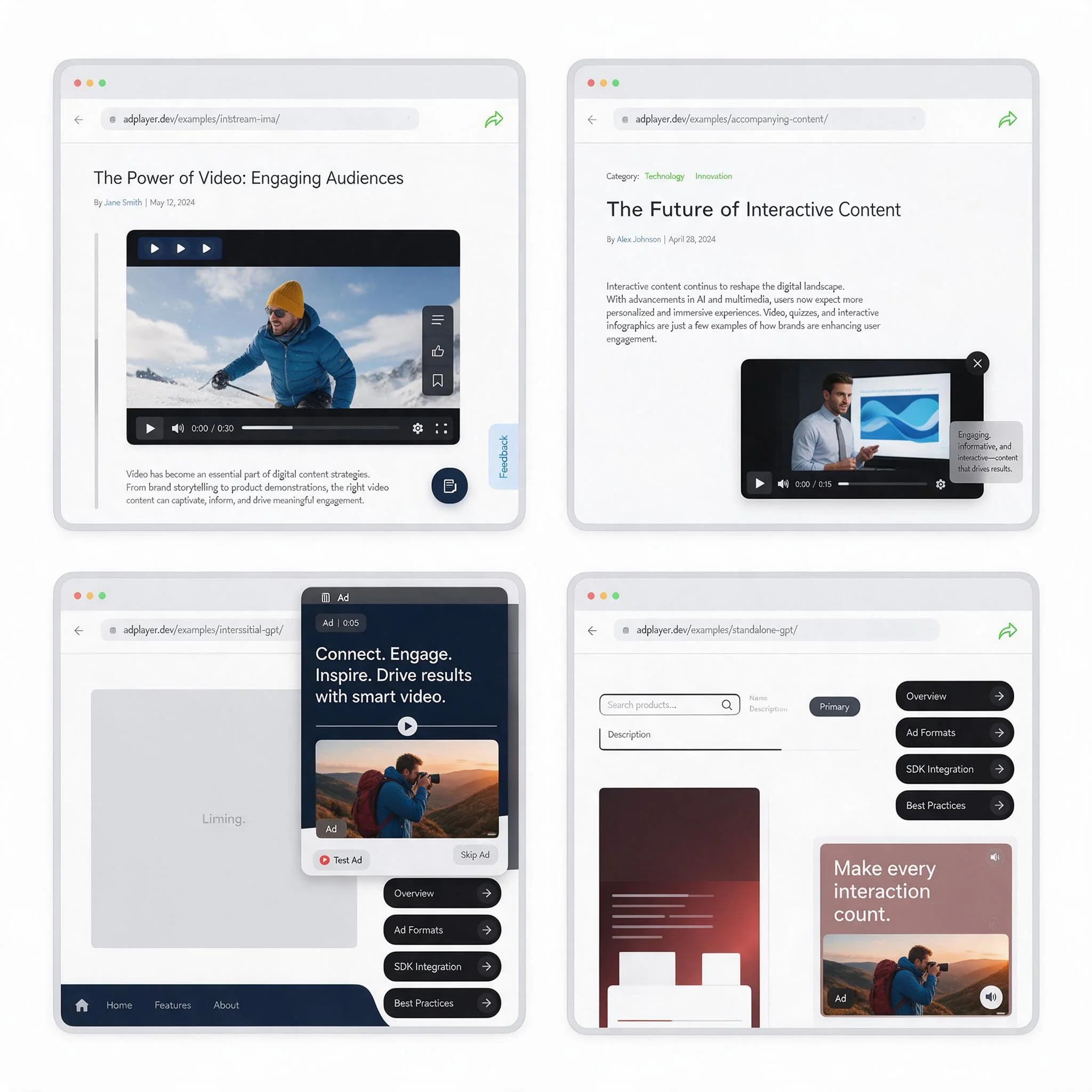
This policy revision directly resolves one of the most persistent tension points between Core Web Vitals optimization and programmatic video yield. Previously, publisher engineering teams had to mount heavy video player DOM trees directly inside the main article column, wait for the user to scroll the inline player into the viewport, fire the initial IMA SDK ad request, and then dynamically reparent or restyle the player into a position: fixed corner container as the user scrolled down the page. By decoupling plcmt: 2 eligibility from inline article body initialization and scroll-triggered state transitions, Google enabled cleaner frontend architectures, faster time-to-first-frame, and substantially higher video viewability across desktop and mobile web viewports.
Removal of the Requirement That Accompanying Content Must Load in the Page Body First
Under the October 22, 2026 policy update, Google removed the requirement that Accompanying Content players must load within the main body of the page. Historically, if a publisher placed a video player in a dedicated right-hand rail, a persistent sidebar container, or an auxiliary viewport zone outside the primary <article> or <main> DOM node, Google policy auditors frequently flagged the placement as non-compliant for Accompanying Content status, forcing the publisher to downgrade the unit to Standalone (plcmt: 4) or re-architect their page templates.
With this restriction removed, monetization architects can instantiate Accompanying Content video players directly inside dedicated rail containers, split-screen layouts, or fixed viewport anchors from the initial page render. From a systems engineering perspective, this eliminates the need to inject dynamic DOM placeholder nodes between paragraphs of editorial text. Publishers operating Single Page Applications (SPAs) built on React, Next.js, or Vue can maintain a persistent, non-destructible video player component mounted outside the dynamic article router view. When a user navigates between articles or scrolls through infinite-scroll editorial feeds, the Accompanying Content player remains intact without tearing down the HTML5 <video> element or interrupting an active VAST 4.3 ad pod.
Furthermore, mounting the player outside the main editorial text flow dramatically improves Cumulative Layout Shift (CLS) metrics. When inline video containers dynamically expand or collapse inside the primary text column during asynchronous Prebid.js and GAM auction resolution, they push paragraphs downward and degrade search engine ranking signals. Initializing the Accompanying Content player in a reserved layout slot outside the main body completely isolates text rendering from video player lifecycle events.
Removal of the Scroll-Transition Mandate for Sticky Video Players
Equally consequential is Google's October 22, 2026 removal of the requirement that sticky players must start in the main content of the page and only transition into a sticky state as a user scrolls. Under the legacy policy, launching a video player directly in a pinned bottom-right or top-right viewport position on initial page load was strictly prohibited for Accompanying Content (plcmt: 2) inventory. Publishers had to prove that the player began its lifecycle inline within the main content column, achieved visibility in that inline position, and transitioned to its sticky coordinates solely in response to user scroll events.
That legacy scroll-transition mandate created two acute production problems: first, it caused high impression drop-off on pages where users read the top fold or interacted with interactive charts without immediately scrolling past the inline video slot; second, the JavaScript scroll listeners and CSS layout recalculations required to smoothly detach an active video element and dock it into a fixed corner frequently caused main-thread jank and brief frames of 0% viewability during the DOM transition.
Following the October 22, 2026 update, an Accompanying Content player may initialize immediately in its sticky or pinned viewport position upon page load, provided it satisfies all remaining baseline Google Publisher Policies. Specifically, AdOps teams must enforce three permanent guardrails on sticky implementations:
- No Content Occlusion: The sticky player must never obscure or overlap primary editorial text, navigation menus, or interactive page controls. On smaller mobile screens, engineers should allocate dedicated bottom or top viewport padding or dock the sticky player cleanly flush against the viewport edge so underlying text can always be scrolled completely into clear view.
- Visible Dismiss Control: Every sticky video player must render an immediately accessible, high-contrast close or dismiss button (
X) that allows the user to terminate or unpin the sticky unit at any time during either the ad break or the editorial video playback. - Genuine Accompanying Video Content: Relaxing the sticky initialization rule does not alter the core definition of
plcmt: 2. The sticky player must still deliver legitimate streaming editorial video content alongside the page's text content, and any autoplay initiation must begin muted (vpmute=1).
Supported SDK Implementations: Why Standalone & Interstitial Video Must Use GPT or GMA SDK (Not IMA SDK)
One of the strictest technical boundaries in Google's Video Inventory Restrictions governs which Google client SDK is authorized to request and render ads for each placement category. Google enforces a hard binary split across its SDK ecosystem:
- In-Stream (
plcmt: 1) and Accompanying Content (plcmt: 2): Must be monetized using the Google Interactive Media Ads (IMA) SDK (Client-Side HTML5, iOS, Android, tvOS) or the Programmatic Access Library (PAL) SDK (for custom players and Server-Side Ad Insertion / SSAI workflows). - Interstitial (
plcmt: 3) and Standalone (plcmt: 4): On web and mobile apps, these placements are strictly prohibited from using the IMA SDK or PAL SDK to request Google demand. Instead, they must be requested and rendered through Google Publisher Tags (GPT) on the web or the Google Mobile Ads (GMA) SDK on iOS and Android.
Why does Google enforce this architectural separation at the SDK level? The IMA SDK and PAL SDK are purpose-built to manage linear ad breaks synchronized with a host content video player (contentComplete listeners, VMAP pod scheduling, and mid-roll cue points). Historically, bad actors and misconfigured outstream wrappers instantiated headless or zero-duration IMA SDK instances inside standard display <div> containers on text pages, passing IMA-specific query parameters (env=instream, output=vast) to trick AdX and connected DSPs into bidding on Standalone outstream inventory as if it were high-value In-Stream video.
By mandating that Standalone (plcmt: 4) and Interstitial (plcmt: 3) placements execute through GPT on web and the GMA SDK on mobile apps, Google ensures that the ad container, viewability tracking (Active View / OMID), close-button enforcement, and plcmt signaling are controlled directly by Google's display and outstream rendering shell rather than an arbitrary third-party video player. If a web publisher fires an IMA SDK ad request from a Standalone video unit that contains no editorial video stream, Google Ad Manager's policy crawlers detect the absence of content playback following the complete event and suspend ad serving to that ad unit path.
For hybrid monetization architectures running Prebid.js 11.x alongside Google Ad Manager on a single page that features both an Accompanying Content sticky player (plcmt: 2) and a mid-article Standalone outstream slot (plcmt: 4), the two ad units must be routed through separate GAM integration pipelines. Below is a production-grade Prebid.js 11.x configuration demonstrating how to configure both placement types accurately while routing plcmt: 2 to IMA SDK via pbjs.que and plcmt: 4 directly into a GPT slot:
window.pbjs = window.pbjs || {};
window.pbjs.que = window.pbjs.que || [];
window.googletag = window.googletag || { cmd: [] };

const videoAdUnits = [
  // Unit 1: Accompanying Content Sticky Player (plcmt: 2) -> Routed to GAM via IMA SDK
  {
    code: 'sticky-accompanying-player',
    mediaTypes: {
      video: {
        context: 'instream',
        playerSize: [640, 360],
        mimes: ['video/mp4', 'video/webm', 'application/javascript'],
        protocols: [2, 3, 5, 6, 7, 8, 11, 12],
        plcmt: 2,
        placement: 2,
        playbackmethod: [2], // Autoplay muted on page load
        minduration: 5,
        maxduration: 30,
        startdelay: 0,
        linearity: 1,
        api: [7]
      }
    },
    bids: [
      {
        bidder: 'skyboosts',
        params: {
          placementId: 'sb-video-accompanying-8821',
          endpointId: 'us-east-1'
        }
      }
    ]
  },
  // Unit 2: Standalone In-Article Video (plcmt: 4) -> Rendered via GPT / Prebid Outstream
  {
    code: 'div-gpt-ad-standalone-video',
    mediaTypes: {
      video: {
        context: 'outstream',
        playerSize: [640, 360],
        mimes: ['video/mp4', 'video/webm'],
        protocols: [2, 3, 5, 6, 7, 8],
        plcmt: 4,
        placement: 4,
        playbackmethod: [6], // Initiates on entering viewport muted
        minduration: 5,
        maxduration: 30,
        linearity: 1
      },
      banner: {
        sizes: [[300, 250], [640, 360]]
      }
    },
    bids: [
      {
        bidder: 'skyboosts',
        params: {
          placementId: 'sb-video-standalone-8822',
          endpointId: 'us-east-1'
        }
      }
    ]
  }
];

pbjs.que.push(function() {
  pbjs.setConfig({
    debug: false,
    priceGranularity: 'high',
    cache: {
      url: 'https://prebid.skyboosts.com/pbc/v1/cache'
    },
    ortb2: {
      site: {
        domain: window.location.hostname,
        page: window.location.href
      }
    }
  });

  pbjs.addAdUnits(videoAdUnits);

  pbjs.requestBids({
    timeout: 1200,
    bidsBackHandler: function() {
      // 1. Send targeting for GPT Standalone / Multi-format slot (plcmt: 4)
      pbjs.setTargetingForGPTAsync(['div-gpt-ad-standalone-video']);
      googletag.cmd.push(function() {
        googletag.pubads().refresh();
      });

      // 2. Build Master Video Tag for IMA SDK Accompanying Content player (plcmt: 2)
      const imaVASTTagUrl = pbjs.adServers.dfp.buildVideoUrl({
        adUnit: videoAdUnits[0],
        params: {
          iu: '/21804912/news_web/accompanying_sticky',
          description_url: encodeURIComponent(window.location.href),
          vpmute: 1,
          vpa: 'auto',
          plcmt: 2
        }
      });

      if (window.initializeStickyIMAPlayer) {
        window.initializeStickyIMAPlayer(imaVASTTagUrl);
      }
    }
  });
});
Notice the critical distinction in the bidsBackHandler callback above: the Accompanying Content (plcmt: 2) unit constructs a GAM Master Video Tag via pbjs.adServers.dfp.buildVideoUrl and passes it into the IMA SDK player with vpmute: 1 and plcmt: 2, whereas the Standalone (plcmt: 4) unit passes key-value targeting directly into googletag.pubads() so that GPT manages the slot lifecycle natively.
Audibility Declarations (vpmute), 50% Viewability Autoplay Rules, and CTV/DOOH Restrictions
Beyond placement taxonomy and SDK selection, Google's Video Inventory Restrictions enforce rigorous runtime controls over audio states, viewport visibility thresholds, and screen-type restrictions. Failing to synchronize client-side player behavior with the parameters declared in the ad request causes immediate discrepancies between publisher impression counts and Active View measurable impressions.
Audibility Declarations (vpmute and vpa): Every video ad request sent to Google Ad Manager passes two critical state signals: vpa (video play auto vs. click) and vpmute (0 for unmuted, 1 for muted). While the IMA SDK automatically inspects the attached HTML5 <video> element's .muted and .volume properties at the moment adsLoader.requestAds() fires, publishers constructing server-side VAST tags or PAL SDK requests must populate vpmute accurately. Under Google policy, Accompanying Content (plcmt: 2) and Standalone (plcmt: 4) units that initiate via autoplay must start muted (vpmute=1, playbackmethod: 2 or 6). Furthermore, a publisher may never have more than one video player playing with sound simultaneously on a single page or screen. If a user clicks to unmute a sticky Accompanying Content player while another video unit is audible, the application logic must immediately mute or pause the secondary player.
The 50% Viewability Autoplay and Pause-on-Exit Rule: To protect advertiser viewability metrics and complies with IAB and MRC video viewability standards (which require at least 50% of the player's pixels to remain in the active viewport for at least two continuous seconds), Google mandates strict viewport lifecycle management for all autoplay video units (plcmt: 2 and plcmt: 4):
- An autoplay video ad must not begin playback until at least 50% of the ad unit's pixels are visible within the user's active viewport.
- If the user scrolls the page or switches browser tabs such that less than 50% of the video unit remains visible, the player must immediately pause video playback until 50% visibility is restored.
While GPT handles this viewport gating automatically for native GAM outstream formats, engineering teams managing custom Accompanying Content players (plcmt: 2) or Prebid outstream renderers must bind an HTML5 IntersectionObserver with threshold: [0.5] and a document.visibilitychange listener directly to the IMA AdsManager.pause() and AdsManager.resume() methods. Even when using a sticky Accompanying Content player that initializes in a fixed viewport position under the October 22, 2026 policy update, binding an IntersectionObserver ensures that if a modal dialog, cookie consent banner, or mobile virtual keyboard covers more than 50% of the player container, playback pauses cleanly until the obstruction clears.
Connected TV (CTV) and Digital Out-of-Home (DOOH) Restrictions: As publishers expand across multi-screen video environments, engineering teams must account for how Google's Video Inventory Restrictions apply to living-room and public screens. Detailed in our comprehensive CTV ad ecosystem guide, CTV inventory operates under fundamentally different user-intent assumptions than web or mobile app pages. On CTV devices (such as Roku, Apple tvOS, Amazon Fire TV, Samsung Tizen, and LG webOS), primary full-screen streaming playback qualifies as In-Stream (plcmt: 1) with sound on by default (playbackmethod: 1, vpmute=0), executed via client-side IMA SDK, PAL SDK, or Server-Side Ad Insertion (SSAI).
However, CTV home screens, electronic program guides (EPGs), and menu navigation overlays frequently incorporate promotional video tiles. Under Google's Video Inventory Restrictions, Standalone (plcmt: 4) and Interstitial (plcmt: 3) video placements are not supported on Connected TV or Digital Out-of-Home (DOOH) inventory through standard Google demand pipelines unless deployed through explicitly approved, platform-specific Google integration programs. Attempting to monetize a silent promotional tile on a CTV app home screen by passing plcmt: 1 via an SSAI stitcher violates Google's In-Stream policy and risks domain-level or app-bundle blocks. Publishers utilizing a specialized CTV monetization platform should segregate EPG or menu preview video units from full-episode streams (plcmt: 1) and ensure that every SSAI OpenRTB 2.6 bid request carries accurate imp.video.plcmt, app.bundle, and device.ifa parameters.
Before pushing any new video player template or Prebid.js upgrade to production, AdOps and frontend engineering teams should execute the following five-point verification protocol in browser developer tools and Charles Proxy:
- Verify
imp.video.plcmtParity: Confirm that every outgoing Prebid.js / Prebid Server OpenRTB 2.6 bid request and GAM ad request (plcmtparameter) declares the identical placement integer (1,2,3, or4) matching the actual runtime behavior of the player. - Audit SDK Signatures by Placement Type: Ensure IMA SDK or PAL SDK is invoked exclusively for
plcmt: 1(In-Stream) andplcmt: 2(Accompanying Content) units that play genuine streaming video content, and confirm that allplcmt: 3(Interstitial) andplcmt: 4(Standalone) units on web and mobile app execute strictly through GPT or the GMA SDK. - Validate Sticky Player Non-Occlusion and Dismiss Controls: When leveraging the October 22, 2026 Google policy update to launch Accompanying Content (
plcmt: 2) players directly in a sticky position or outside the main page body, verify across desktop and mobile viewports that the sticky container never covers editorial text and renders a persistent, functional close button. - Test Muted Autoplay and
vpmute=1Signaling: Confirm that all autoplay Accompanying Content and Standalone units initialize with the HTML5 video element muted and transmitvpmute=1andplaybackmethod: 2(or6) in every upstream bid request. - Confirm 50% Viewport Pause Enforcement: Throttle network speeds and scroll the player partially out of the viewport or switch browser tabs during an active VAST ad break to verify that
IntersectionObserverlogic pauses playback immediately below 50% visibility and fires the VAST<Tracking event="pause">beacon accurately.