
High-Impact Sticky, Anchor, and Outstream Video Units: CSS Positioning, Close Button UX, and October 2026 GAM Rules
Media Rating Council (MRC) and IAB Tech Lab viewability standards establish a strict binary threshold for programmatic impression quality: a display creative

Media Rating Council (MRC) and IAB Tech Lab viewability standards establish a strict binary threshold for programmatic impression quality: a display creative must render at least 50% of its pixels inside the active viewport for one continuous second, while a video ad requires 50% pixel visibility for two continuous seconds. Standard inline ad slots placed inside the document flow remain vulnerable to rapid user scroll velocity, especially on mobile viewports where inertial scrolling frequently pushes inline containers out of view before the Google Publisher Tag (GPT) finishes creative frame initialization and asset downloading. When an inline slot fails that one-second or two-second threshold, Google Ad Manager (GAM) logs an unviewable impression, degrading the historical Active View score of the underlying ad unit.
Demand-Side Platforms (DSPs) ingest historical slot-level viewability telemetry through bid request extensions and internal supply path optimization (SPO) models. Inventory tiers that consistently sustain 75% or higher viewability command higher bid density and superior clearing prices because buyers price their bids on a cost-per-viewable-impression (vCPM) basis. Anchoring display and outstream video placements to the viewport via CSS position: fixed decouples viewability from user scroll behavior. At Sky Boosts, our engineering teams architect high-impact sticky display and standalone video implementations across Google AdX, Open Bidding, and Prebid stacks to capture top-tier vCPM demand while enforcing strict compliance with Google Publisher Policies and coalition standards.
Why Sticky Display and Video Units Deliver 75%+ Viewability and Premium CPMs
Programmatic bidding algorithms evaluate an ad request milliseconds before deciding whether to allocate compute resources and working media budget to an auction. In OpenRTB 2.6 transactions, SSPs transmit historical viewability predictors alongside explicit slot visibility signals, including the imp.metric array where viewability probabilities are declared by the exchange. When a publisher deploys sticky banner formats docked to the top or bottom edge of the viewport, the container remains pinned across the user session regardless of scroll depth. Because the container never exits the active viewport after initial render, measured Active View rates routinely reach 75% to 92%, outperforming standard in-content placements that average 45% to 55% viewability on long-form mobile web pages.
Crossing the 75% viewability threshold triggers a structural shift in buyer participation. Tier-1 DSPs segment supply into viewability tiers (commonly 50%+, 60%+, 70%+, and 75%+). Brand campaigns with strict quarterly verification targets configure automated pre-bid filters that discard bid requests originating from slots below the 70% or 75% historical threshold. Moving an ad unit from 58% viewability to 82% viewability does not merely improve impression quality linearly; it unlocks an entirely separate pool of guaranteed and programmatic demand that was previously filtered out pre-auction. Along with full-screen placements like the interstitial format, persistent viewport units represent the highest-yielding inventory class available to web and mobile app publishers.
Persistent viewport residency also enables time-based viewability refresh cycles. Whereas an inline banner scrolled out of view after three seconds can only monetize a single impression per pageview, a sticky anchor unit remains continuously in view, allowing the wrapper to execute compliant active-view refreshes every 30 to 60 seconds of accumulated visible time. Furthermore, for outstream video demand, sticky execution solves the primary failure mode of in-article video: low completion rates. DSPs optimize video bidding heavily toward Cost Per Completed View (CPCV) and Video Completion Rate (VCR) metrics. A video player that stays visible in a corner dock throughout a 15-second or 30-second VAST 4.3 linear creative achieves 70%+ completion rates, driving substantial eCPM expansion. Publishers evaluating the compounding yield effect of 75%+ viewability combined with active-view refresh intervals can model projected revenue gains against their own impression volumes.
Navigating Google's Updated Rules for Sticky Display and Sticky Video
Capturing high-viewability demand through persistent placements requires strict adherence to Google Publisher Policies, Google Ad Manager inventory rules, and the Coalition for Better Ads standards. Automated crawlers and real-time client-side verification scripts continuously inspect DOM geometry, CSS positioning properties, and viewport coverage ratios across AdX and Open Bidding impressions. When a sticky implementation violates spatial caps or obscures primary page content without proper user controls, Google Ad Manager can restrict serving at the ad unit level or apply site-wide policy enforcement.
From an architectural perspective, AdOps teams must separate policy governance into two distinct regimes: sticky display anchors and sticky video players. Although both rely on fixed viewport positioning in the browser rendering layer, Google enforces separate spatial constraints, declaration mechanics, and dismissibility requirements for each format.
Display Anchors: The 30% Screen Height Cap and GAM Inventory Declarations
Under GoogleAd Manager regulations and the Better Ads Standards, fixed display units must never consume more than 30% of the vertical screen height at any point during the user session. On a standard mobile viewport with a logical CSS height of 667px to 844px, a 320x50 or 320x100 mobile leaderboard easily clears this ceiling, occupying roughly 7% to 15% of the screen. However, if a publisher permits a 300x250 medium rectangle to render inside a sticky bottom container on a compact viewport (or allows simultaneous sticky display elements to stack), the combined height can breach the 30% threshold and trigger a policy violation for intrusive layout density.
In addition to the 30% vertical screen cap, sticky display ads must obey strict positional boundaries:
- Edge Alignment Only: On mobile viewports, sticky display units must dock flush against the extreme top or extreme bottom edge of the screen. Floating a display banner in the middle of the viewport or docking it along the left or right vertical margins on mobile devices is prohibited.
- Single Sticky Display Unit Limit: Only one sticky display unit may remain visible inside the viewport at any given moment. A page cannot simultaneously display a sticky top header banner and a sticky bottom anchor banner.
- Opaque Background Separators: A sticky container cannot hover over page text with a transparent background. It must render inside a clearly delineated container with a solid background and a visible border or drop shadow that separates the advertisement from underlying editorial content.
- Mandatory GAM Declaration or Native GPT API Usage: When monetizing sticky display slots through Google AdX or Open Bidding, buyers must be informed that the impression is rendering inside a sticky container. The preferred engineering path is to initialize native GPT out-of-page anchor slots (
googletag.enums.OutOfPageFormat.BOTTOM_ANCHORorTOP_ANCHOR), which automatically pass the sticky inventory signal into the bid request and manage the collapse drawer UI. If a publisher builds a custom CSSposition: fixedcontainer to run unified Prebid.js header bidding alongside GAM, that specific ad unit must be explicitly declared as a sticky placement inside the Google Ad Manager UI under Inventory Rules and Publisher Declarations.
Sticky Video (October 2026 Update): Launching Directly in Sticky Mode with a Persistent Dismiss Option
Historically, programmatic video publishers faced a severe engineering constraint when deploying sticky video players on Google demand paths. Under legacy GAM policy rules, any sticky video player (whether monetizing Accompanying Content or standalone outstream placements) was required to initialize and begin playback inside the main document flow first, transitioning into a minimized floating or docked position only after the user scrolled past the original inline container. Implementing this required complex IntersectionObserver thresholds, placeholder DOM shims to prevent Cumulative Layout Shift (CLS) when the player detached from the article body, and intricate state synchronization between the inline wrapper and the fixed corner viewport dock.
That architectural constraint has been officially eliminated. As of October 22, 2026, Google removed the requirement that Accompanying Content and sticky video players must initially render inside the main body of the page before transitioning to a sticky state on scroll. Publishers can now initialize both Accompanying Content players and standalone sticky video units directly inside their docked, fixed-position container from the initial moment of slot rendering, completely bypassing the inline-to-sticky scroll transition lifecycle.
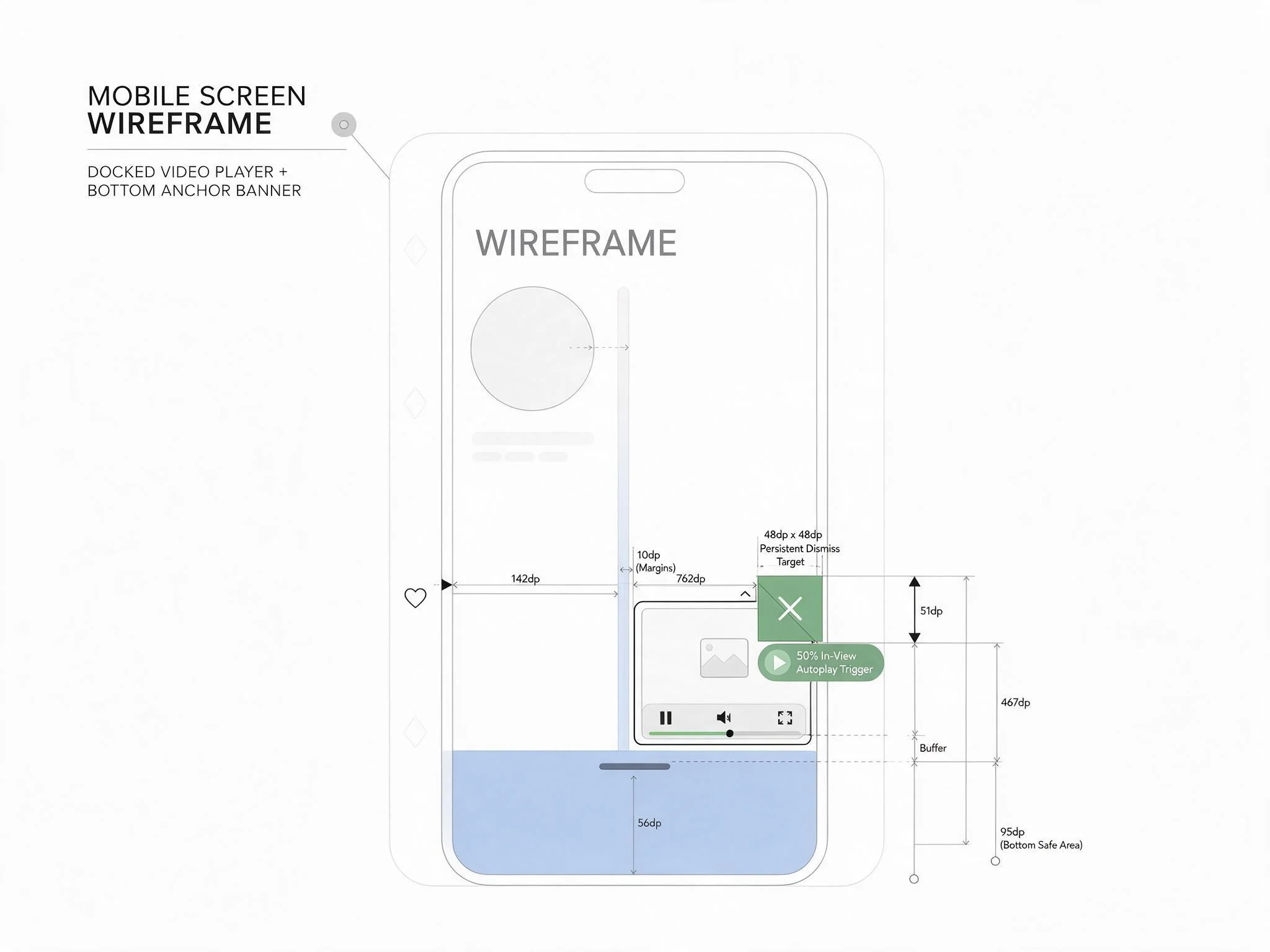
While the October 22, 2026 policy update removes the inline initialization mandate, strict visibility and user-control rules remain enforced. Specifically, Google Video Inventory Restrictions allow sticky video placements (on web and app, excluding CTV/DOOH) provided a functional, unobstructed dismiss option is displayed for the entire duration and autoplay waits until 50% of the unit is visible. To pass automated policy audits when launching a video player directly in sticky mode, the player wrapper must satisfy three engineering conditions:
- Persistent, Unobstructed Close Control: A clearly visible dismiss button must render immediately upon player initialization and remain present and interactive for the entire duration of the video ad and content lifecycle. It cannot be hidden behind a hover state, delayed by a countdown timer, or covered by VAST interactive overlays.
- 50% Visibility Autoplay Gate: Even when launching directly in a fixed viewport position, the player controller must verify via the browser
IntersectionObserverAPI that at least 50% of the player container is within the visible viewport and not obscured by browser chrome, consent management platform (CMP) modals, or higherz-indexoverlays before triggering muted autoplay. - Zero Viewport Collision: If a sticky video unit launches directly in the bottom-right corner of the viewport, its bounding box must never intersect or overlap an active bottom display anchor or navigation bar.
Implementing Standalone Outstream Video via GPT Without a Video Content Player
Capitalizing on the October 2026 GAM rules does not require licensing a heavyweight Online Video Platform (OVP) or streaming actual editorial video content if the monetization objective is strictly standalone outstream yield. By combining Prebid.js 11.x with Google Publisher Tag, AdOps engineers can deploy lightweight, standalone outstream video slots that launch directly in a sticky corner container, auctioning the impression simultaneously across Prebid video bidders and Google AdX outstream demand.
At the protocol level, standalone outstream units must signal their exact placement context in OpenRTB 2.6 so DSPs do not mistake the slot for instream inventory. Inside the imp.video object, the bid request must set plcmt: 4 (No Content / Standalone) alongside the legacy placement: 5 attribute, paired with playbackmethod: [2] (initiates on page load with sound off by default). This accurate signaling protects the publisher from DSP supply path penalties while attracting dedicated outstream and multi-format video budgets.
The following production configuration demonstrates how to register a standalone outstream ad unit in Prebid.js 11.x and GPT that renders directly inside a fixed-position sticky container, holding playback until the 50% visibility gate is verified and tearing down the entire DOM node upon user dismissal:
window.googletag = window.googletag || { cmd: [] };
window.pbjs = window.pbjs || { que: [] };

const STICKY_VIDEO_DIV = 'skyboosts-sticky-outstream';
let stickySlot = null;

function mountStickyVideoContainer() {
  const wrapper = document.getElementById('skyboosts-sticky-video-wrapper');
  const closeBtn = document.getElementById('skyboosts-sticky-close');
  if (!wrapper || !closeBtn) return;

  closeBtn.addEventListener('click', (e) => {
    e.stopPropagation();
    e.preventDefault();
    if (stickySlot) {
      googletag.destroySlots([stickySlot]);
    }
    wrapper.remove();
  }, { once: true });
}

const videoAdUnit = {
  code: STICKY_VIDEO_DIV,
  mediaTypes: {
    video: {
      context: 'outstream',
      playerSize: [300, 169],
      mimes: ['video/mp4', 'video/webm'],
      protocols: [2, 3, 5, 6, 7, 8],
      playbackmethod: [2],
      minduration: 1,
      maxduration: 30,
      plcmt: 4,
      placement: 5,
      api: [2, 7]
    }
  },
  bids: [
    {
      bidder: 'skyboosts',
      params: { placementId: 'sb_outstream_sticky_01' }
    }
  ]
};

function initStickyOutstreamAuction() {
  const targetEl = document.getElementById(STICKY_VIDEO_DIV);
  if (!targetEl) return;

  const observer = new IntersectionObserver((entries, obs) => {
    entries.forEach((entry) => {
      if (entry.isIntersecting && entry.intersectionRatio >= 0.5) {
        obs.disconnect();
        executeBidCycle();
      }
    });
  }, { threshold: [0.5] });

  observer.observe(targetEl);
}

function executeBidCycle() {
  googletag.cmd.push(() => {
    stickySlot = googletag.defineSlot('/21900000000/sticky_outstream', [[300, 169], [300, 250]], STICKY_VIDEO_DIV)
      .addService(googletag.pubads());
    googletag.pubads().disableInitialLoad();
    googletag.enableServices();
  });

  pbjs.que.push(() => {
    pbjs.addAdUnits([videoAdUnit]);
    pbjs.requestBids({
      timeout: 1400,
      bidsBackHandler: () => {
        pbjs.setTargetingForGPTAsync([STICKY_VIDEO_DIV]);
        googletag.cmd.push(() => {
          googletag.pubads().refresh([stickySlot]);
        });
      }
    });
  });
}

document.addEventListener('DOMContentLoaded', () => {
  mountStickyVideoContainer();
  initStickyOutstreamAuction();
});
By gating executeBidCycle() behind an IntersectionObserver configured with threshold: [0.5], the wrapper guarantees that neither the auction nor video autoplay fires if the fixed container is hidden by a full-screen CMP modal or an uncollapsed layout overlay on initial load. Once the user dismisses the unit via #skyboosts-sticky-close, calling googletag.destroySlots([stickySlot]) cleanly halts VAST tracking pings, terminates any active refresh timers, and removes the wrapper from the DOM.
Preventing Layout Overlap and Accidental Clicks with 48x48dp Close Targets
The primary engineering risk when deploying sticky display anchors and docked sticky video units is accidental click generation near the dismiss button. Google AdX and Open Bidding continuously monitor the ratio of clicks that immediately result in a bounce back to the publisher page. When a user attempts to tap a tiny close icon and accidentally strikes the underlying ad iframe, Google's invalid traffic (IVT) filters detect the anomalous click-to-bounce pattern and apply the "Confirmed Click" penalty (also known as the Two-Click Penalty) to the ad unit. Under Confirmed Click, the user must tap the ad twice before navigating to the advertiser landing page, which typically reduces click-through rates (CTR) and performance-buyer eCPMs by 35% to 60%.
Eliminating accidental clicks and viewport collisions requires strict CSS geometry and hit-target engineering:
- Enforce a Minimum 48x48dp Touch Target: Both W3C Web Content Accessibility Guidelines (WCAG 2.2) and Google Android/Web UX standards mandate a minimum interactive touch target of 48x48 density-independent pixels (
48pxby48pxin CSS logical pixels). Even if the visual "X" glyph inside the close button measures 24x24px, the clickable<button>element itself must span a full 48x48px bounding box, isolated from the ad iframe withpointer-events: autoand an explicit dead-zone margin so a slightly off-center thumb tap never passes through to the creative frame. - Respect Device Safe Area Insets: Modern iOS Safari (WebKit) and Android Chromium browsers render OS-level gesture bars and dynamic toolbars at the bottom of the screen. Docking a container at
bottom: 0without accounting forenv(safe-area-inset-bottom)places the ad or its close button directly beneath the OS home indicator, causing swipe gestures to register as ad clicks. - Coordinate Vertical Offsets Between Anchors and Sticky Video: When a bottom display anchor (e.g., 50px to 90px tall) and a bottom-right sticky video player are active on the same page, the video wrapper must dynamically offset its
bottomCSS coordinate via a CSS custom property (--anchor-offset) so the two containers remain separated by at least 16px of whitespace.
The following CSS implementation establishes a collision-proof layout for a direct-to-sticky video wrapper with a compliant 48x48px close target and hardware safe-area support:
:root {
  --anchor-offset: 66px;
}

#skyboosts-sticky-video-wrapper {
  position: fixed;
  right: 12px;
  bottom: calc(var(--anchor-offset, 0px) + env(safe-area-inset-bottom, 0px) + 16px);
  width: 300px;
  height: 169px;
  background-color: #0f172a;
  border: 1px solid #334155;
  border-radius: 6px;
  box-shadow: 0 8px 24px rgba(0, 0, 0, 0.35);
  z-index: 2147483000;
  contain: layout style;
}

#skyboosts-sticky-close {
  position: absolute;
  top: -20px;
  right: -8px;
  width: 48px;
  height: 48px;
  padding: 0;
  margin: 0;
  background: transparent;
  border: none;
  cursor: pointer;
  display: flex;
  align-items: center;
  justify-content: center;
  z-index: 2147483001;
  touch-action: manipulation;
}

#skyboosts-sticky-close-visual {
  width: 28px;
  height: 28px;
  border-radius: 50%;
  background-color: rgba(15, 23, 42, 0.92);
  border: 1.5px solid #ffffff;
  color: #ffffff;
  font-family: system-ui, -apple-system, sans-serif;
  font-size: 16px;
  font-weight: 700;
  line-height: 25px;
  text-align: center;
}
Positioning #skyboosts-sticky-close at top: -20px moves the majority of the 48x48px hit box outside the upper boundary of the 300x169 video iframe, while the visual 28x28px circular badge sits cleanly at the top-right corner of the player frame. If a user taps slightly below or to the left of the visual badge, the outer 48x48px button captures the event, invokes e.stopPropagation(), and destroys the slot without triggering a click inside the VAST creative or ad iframe.
For engineering and AdOps teams upgrading their monetization stack for the post-October 2026 Google Ad Manager ruleset, the architectural directive is clear: retire legacy inline-to-sticky scroll observers that delay video initialization and inflate CLS scores. Instead, deploy direct-to-sticky outstream containers gated by a strict 50% IntersectionObserver check, declare sticky display inventory accurately inside GAM, enforce the 30% viewport height cap, and wrap every dismiss control in an isolated 48x48px hit box. At Sky Boosts, our SSP and managed Prebid wrapper solutions provide pre-verified sticky display and outstream video modules backed by curated, 100% Google-friendly demand and predictable Net-30 and Net-60 payouts.